The World Flows.
You Command.
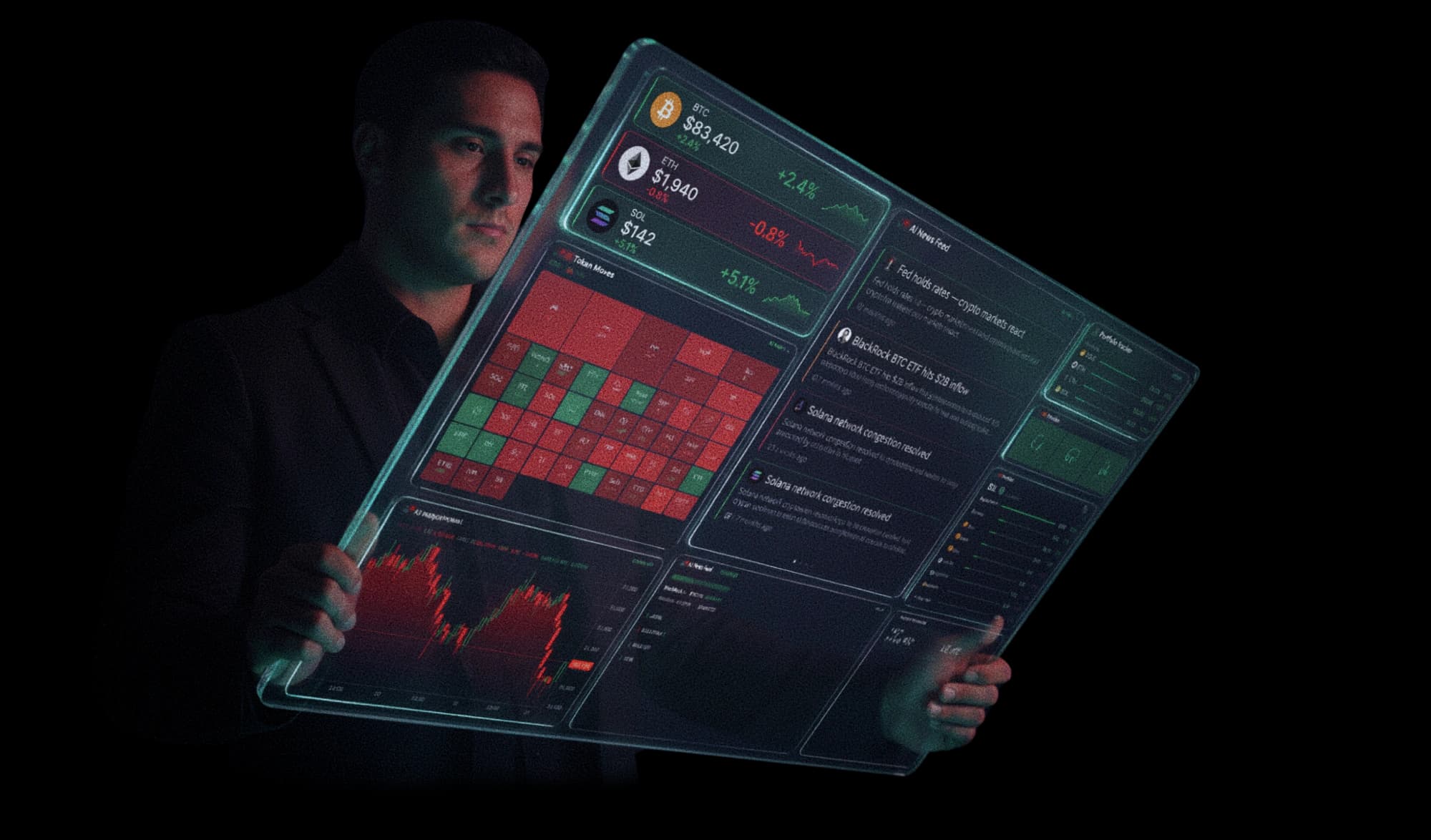
Markets, news, and social signals — unified.
One dashboard. Zero noise.

You’re switching
between seven tabs
to understand
one market.
- CoinGeckoprices
- TradingViewcharts
- X / Twittersocial
- Telegramalpha
- Discordcommunities
- Etherscanon-chain
- CoinMarketCaprankings
Tell it how you trade.
It builds your cockpit.
Sign in and Cockpit asks four quick questions: how long you have traded, how you trade, what you watch and which coins to pin. Then it arranges your widgets and pitches Ask Cockpit’s answers at your level. Talk to it, tap or type.
- It suggests, you confirm. Keep the layout or undo it in one tap.
- Skip any time, and run it again from Settings.
- Voice is optional. Your browser turns speech into text; Cockpit never records or stores audio.
Built for “I trade majors”: 10 widgets in 4 groups.
Command,
don’t catch up.
Stop reacting to the news. Start moving with it. Cockpit gives you the same situational awareness as the funds — without the team, the terminal, or the price tag.
Everything.
One screen.
Markets, news, social signals, AI analysis, and whale flow — unified in one customizable dashboard. Drag, drop, dominate.
Watch your command center come alive.
Detect moves
before they happen.
When whale flow, social velocity, volume spikes, and price action converge on the same token, Cockpit flags it. You see it before anyone else does.
An analyst that
never sleeps.
Cockpit reads real market data (prices, whale flows, news, on-chain signals) and writes commentary in trader shorthand. It also answers your questions, reads you the briefing, and explains every signal. Live, every second.
An AI analyst, and then some.
Always onAsk, and it acts
Heard, not just read
“Good morning. Bitcoin's holding above 84K, sentiment leans greedy at 72…”
The why behind the call
▸ 3 of 4 indicators bullish: MACD cross, volume surge, price above the 200MA. RSI cooling off.
Every candle
is a battle.
War Mode renders live order flow as a 3D battlefield. Buyers field the green army, sellers the red, and every real trade moves the front line. This is the order book you can actually feel.
- Market buys reinforce the bullsevery green trade fields more soldiers
- Market sells cut them downred pressure pushes the front line back
- Whale trade sends in a UFOa ~10x-size print strafes the other side
- Hard pump unleashes a tsunamia wall of water sweeps the red army
- Sharp dump cracks the earthan earthquake shakes the whole field
- Extreme move summons the T-rexa rampage tramples the losing side
Free with any account · every Binance-listed token
Ask your AI.
It asks Cockpit.
Connect Claude, Cursor or any MCP client to Cockpit’s live news, whale flow, derivatives positioning, tokenized assets and prices. Your assistant answers with what is happening now, not what it remembers from training.
- 1
Go Pro
MCP access is part of Cockpit Pro.
- 2
Create a key
Account, AI / MCP. Copy it once; revoke it any time.
- 3
Paste into your assistant
One command for Claude Code, one block for Claude Desktop, Cursor or Windsurf.
Are traders crowded long anywhere, and are whales moving money to exchanges?
calls get_derivatives_pulse and get_whale_transfers
Funding is near neutral on BTC and ETH. Two mid-caps sit well above the neutral rate, so longs there are paying up. The largest recent transfers are stablecoins moving onto an exchange; each one links to its transaction.
get_crypto_news
Headlines from 9 newsrooms
get_whale_transfers
Large on-chain transfers, with tx links
get_derivatives_pulse
Open interest, funding, crowding, spreads
get_hyperliquid_whales
Largest Hyperliquid positions and liquidations
get_stablecoin_flows
Stablecoin supply and flows by chain
get_stablecoin_yields
Largest stablecoin pools vs the T-bill rate
get_dex_volume
Spot DEX volume by chain
get_protocol_revenue
What protocols earn and pay to holders
get_tokenized_assets
Tokenized treasuries, gold and stocks
get_prices
Spot price and 24h change
Guardrails
- Read-only. Your assistant can look things up, never trade, move funds or change your account.
- Your key, your control. We store a fingerprint, not the key; revoke it and access stops within a minute.
- Fair limits: 60 calls a minute per key and 2,000 a day per account, so one runaway agent cannot drain anything.
- Data, not advice. Answers come from public market data; decisions stay yours.
Frequently asked questions
What Cockpit is, what it costs, and how it compares. Real-time crypto intelligence, free and with no signup required.
Is Cockpit free to use?
Yes. Cockpit is free to use with no signup required. The free tier includes live prices, news, market widgets, a daily AI briefing, and price alerts. Pro ($14.97/month) unlocks advanced widgets and unlimited AI features, with a 7-day free trial.
Do I need to sign up or connect a wallet?
No. You can open the dashboard and use the free tier instantly without an account or a connected wallet. Signing in (Google, email, or wallet) only adds saved layouts, alerts, and Pro features.
How is Cockpit different from Nansen, Kaito, or other crypto dashboards?
Cockpit unifies markets, news, social signals, whale flow, and AI analysis in one customizable dashboard that is free and needs no signup. Tools like Nansen and Kaito focus on enterprise on-chain or narrative intelligence at $400 or more per month. Cockpit targets the all-in-one, real-time, retail use case at no cost.
What data and signals does Cockpit track?
Live prices across 500+ tokens (30-second refresh), whale alerts and smart money flow, multi-source news, the Fear and Greed Index, DeFi TVL, ETH gas, ETF flows, a memecoin terminal with Pump.fun, Polymarket prediction markets, world indices, and a macro calendar (FOMC, CPI, jobs).
Can I use Cockpit from Claude, ChatGPT-style assistants or Cursor?
Yes, on Pro. Cockpit runs an MCP (Model Context Protocol) server: create a key under Account, AI / MCP, paste one line into Claude Code, Claude Desktop, Cursor or Windsurf, and your assistant can read live crypto news, whale transfers, derivatives positioning and prices. Access is read-only, limited to 60 calls a minute per key, and you can revoke a key at any time.
How does the AI analysis work?
Cockpit's AI briefings and trading signals are powered by Anthropic's Claude. It reads the live market context (prices, sentiment, headlines) and produces plain-language analysis on demand, so you get an analyst's read without the terminal or the team.
What does Cockpit Pro include?
Pro adds 8 advanced widgets (Hot Movements, Smart Money, Stablecoin Flows, Multi-Chart, Macro Calendar, Portfolio Tracker, and Regulatory Feed), unlimited AI briefings and signals, and up to 50 alerts. It is $14.97/month or $119/year with a 7-day free trial.
See everything.
Miss nothing.